The schedule lives in their pocket
Your staff stop texting you to ask when they're working. They open the app, see the week, grab an open shift, and clock in. Included with every plan — even the free one.


Free for everyone on your team. Nothing extra per user, nothing extra per download.
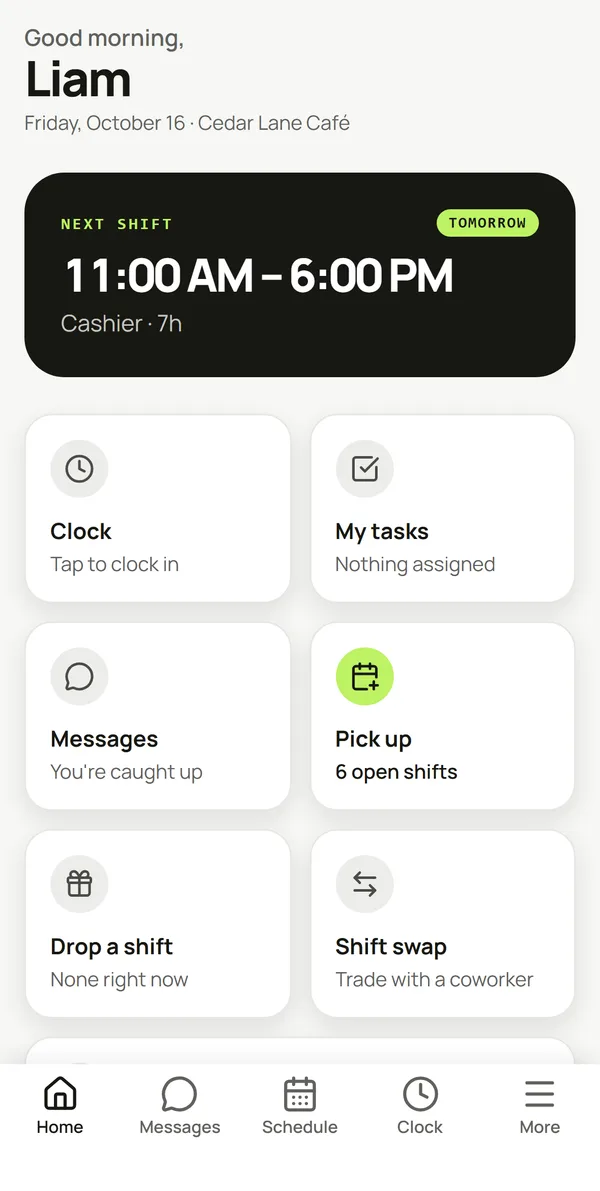
Everything they used to text you about
An employee can run their whole week from the app without going through a manager first.
Their real schedule
Published shifts only, live from the same data the office sees. Change it on the web and their phone catches up — no re-send, no PDF on the wall.
Open shifts
Anything unassigned shows up as available. They claim it from the app; your rules decide whether it sticks.
Swaps and drops
Offer a shift, ask for cover, withdraw an offer, or take someone else's — routed for approval exactly the way you set it up.
Clock in and out
Punches and breaks from the phone, straight onto the timesheet you approve. The whole tab is hidden if you don't run time tracking.
Availability
They set the hours they can actually work, so next week's schedule starts from the truth instead of a guess.
Time off
Requests go in from the phone and land in your approvals queue with the dates already filled in.
Messages and announcements
Direct messages, team threads, and the announcement you need everyone to actually read.
Push notifications
Schedule published, swap approved, shift moved — each alert opens the screen it's about, not the home page.
Approve from the floor. Build from the desk.
Approvals, requests and messages come to your phone, so a swap doesn't sit until you're back at the office. Building and publishing a week stays on the web on purpose — a seven-day grid needs a real screen, and pretending otherwise makes a worse schedule.
Approvals in your pocket
Time off, availability changes, drops, swaps and coverage claims — decide on the spot.
See who's on
The day's agenda for the whole team, not just your own shifts.
Reach everyone
Announcements and team threads, in the app your staff already have open.
Three minutes, start to finish
Install it
Search SimpleStaff on the App Store or Google Play, or point a camera at the code above.
Sign in
The same email and password as the web app — or continue with Apple or Google.
Pick your team
On more than one? Choose once and the app remembers. Switch any time from More.
Questions people actually ask
Does the app cost extra?
No. It's included in every SimpleStaff plan, including the free one. There's no per-download or per-user charge for it, and staff never pay anything.
Do my staff need an account?
They need to be on your team and to have set a password. Employees you added manually still appear on the schedule before they sign up — they just can't open the app until they claim their account.
Can managers build the schedule in the app?
No, and that's deliberate. Managers can approve requests, message the team and see who's working, but building and publishing a week is a web job. A seven-day grid doesn't fit on a phone honestly.
Does it work offline?
It needs a connection to load. You stay signed in between sessions, but the schedule is fetched live rather than stored on the device, so a shift that changed while you were out of signal shows the moment you're back.
What notifications will my staff get?
Schedule published, swap requested and decided, coverage claimed, shift changed, and new messages. Each person chooses which types they want in their profile, and broadcast alerts are rate-limited so republishing a week doesn't spam the team.
Is the mobile website going away?
No. simplestaff.ca works in any phone browser and can be added to a home screen. The native app is faster and is the only way to get push notifications.
What languages does the app support?
The app is English at launch. The web app is available in eight languages, and mobile translations are on the list.
Get it in front of your team
Send them one link. simplestaff.ca/download sends each phone to the right store on its own.
Free on both stores. No separate signup.
SimpleStaff on the App Store: id6795280051. SimpleStaff on Google Play: ca.simplestaff.app.